How to Choose the Best Headless CMS for Next.js in 2026
A practical guide to choosing a headless CMS for Next.js, covering APIs, SEO, analytics, media, developer experience, scalability, and frontend control.
9 min read
How to Choose the Best Headless CMS for Next.js in 2026
Choosing a CMS for a Next.js website is no longer just a question of where to write blog posts.
Modern teams also care about API quality, SEO controls, performance, analytics, media, publishing workflows, developer experience, and how easily the content can move beyond a single website.
That is why the best headless CMS for Next.js is not simply the platform with the longest feature list. It is the one that fits your architecture, gives your team the right content tools, and lets developers keep control of the frontend.
Next.js is a React framework for building full-stack web applications, and its current documentation includes patterns for static and dynamic rendering as well as fetching content from external systems. That makes a headless content layer a natural architecture for many Next.js projects. Next.js documentation
What is a headless CMS for Next.js?
A headless CMS separates content management from the website that displays that content.
The CMS manages structured content such as:
- Posts
- Categories
- Tags
- Authors
- Drafts
- Published content
- SEO metadata
- Media
- Publishing information
Next.js remains responsible for the frontend.
Your application decides how the content looks, how pages are routed, how data is cached, how components are composed, and where the application is deployed.
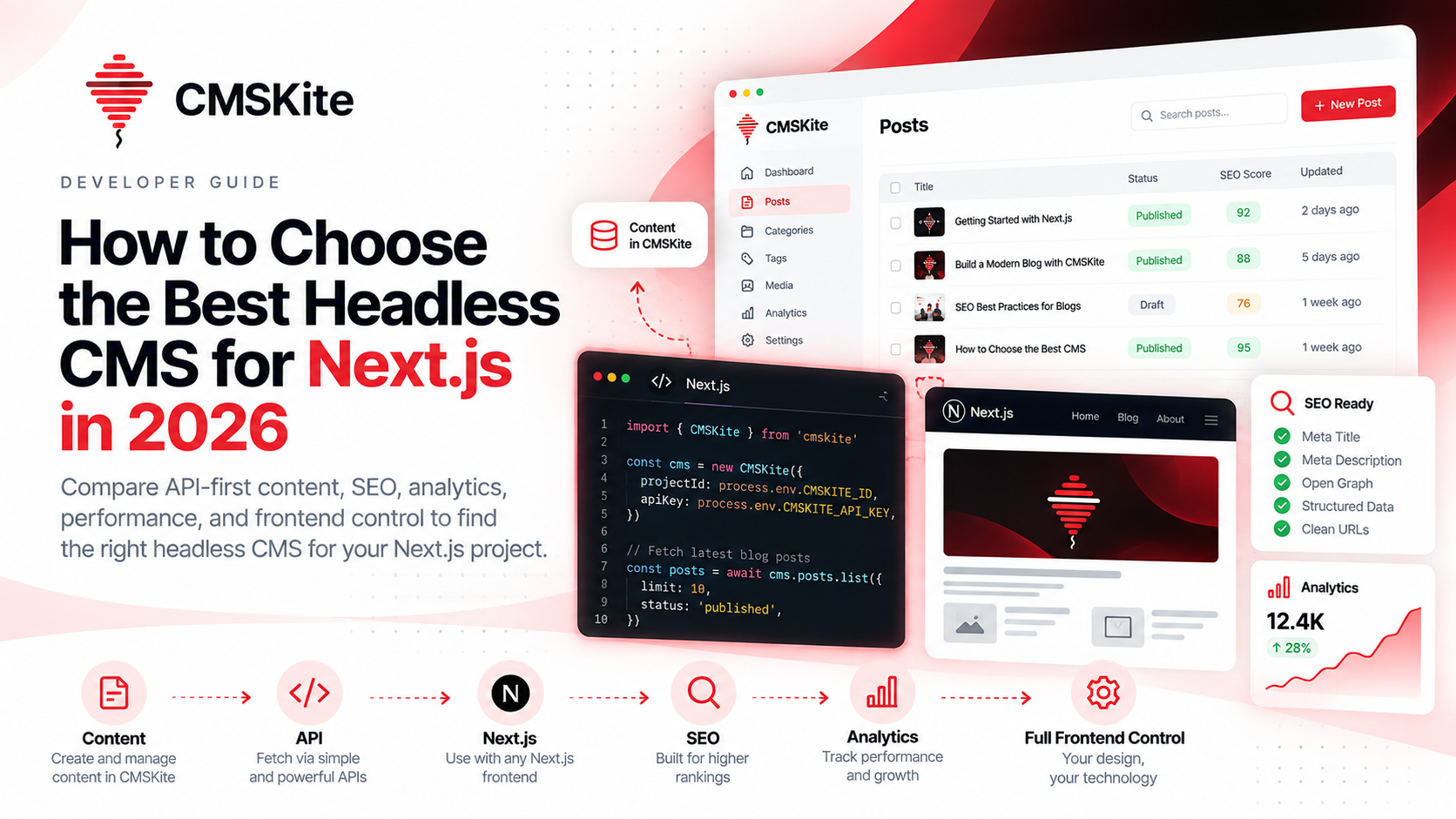
The basic architecture looks like this:
CMS → API → Next.js → Website
That separation is the biggest reason developers choose a headless approach.
Why Next.js and a headless CMS work well together
A modern Next.js application is already designed around composable data and rendering patterns.
Instead of making the CMS responsible for your entire website, you can treat content as a service consumed by the application.
That gives you freedom to:
- Build your own UI.
- Keep an existing design system.
- Control routing and URL structure.
- Use server rendering or static rendering where appropriate.
- Cache content according to your application's needs.
- Deploy the website independently from the CMS.
Next.js documentation also demonstrates fetching external blog data and explains that static rendering is useful for content such as blog posts when the data is shared across users. Next.js data fetching guide and rendering guide.
The important point is that your CMS should support your Next.js architecture, not dictate it.
How to choose the best headless CMS for Next.js
There are several questions you should answer before choosing a platform.
1. Does the CMS have a clean content API?
The API is the foundation.
Your Next.js application should be able to retrieve published content without building a complicated custom integration for every request.
Look for:
- Clear REST or GraphQL APIs
- Predictable response structures
- Filtering
- Pagination
- Search
- Slug-based lookups
- Category and tag filtering
- Published-state handling
- Stable authentication
For a blog, you should be able to do something as simple as:
Get published posts → Render a listing page → Get one post → Render the article page
The simpler this is, the easier your integration becomes.
2. Is the CMS actually built for content teams?
A headless CMS still needs a good content workflow.
Developers care about APIs. Writers and marketers care about publishing.
Your CMS should make it easy to:
- Create drafts
- Edit posts
- Organize categories
- Manage tags
- Assign authors
- Preview content
- Publish content
- Schedule content
- Update existing articles
A developer-first platform should not mean developer-only publishing.
The best architecture is one where developers stay in control of the website while content teams can work independently.
3. Is SEO part of the content model?
This is one of the easiest areas to overlook.
If SEO is important to your website, the CMS should store more than a title and Markdown body.
Useful SEO fields include:
- SEO title
- Meta description
- Focus keyword
- Canonical URL
- Open Graph image
- Indexing controls
- Clean slugs
That means your Next.js page can receive the complete content and SEO configuration from the same source.
You should not have to create a second database just to store SEO metadata.
For a practical overview of modern blog SEO, read SEO Best Practices for Blogs in 2026.
4. Can you keep full frontend control?
A headless CMS should stay headless.
That means your CMS should not force you into a theme system or a page builder when your product already has its own frontend.
With Next.js, you may already have:
- Custom components
- A design system
- Application-level navigation
- Authentication
- Analytics
- Routing
- Search
- Caching
- Deployment automation
Your CMS should plug into that architecture.
It should not replace it.
This is particularly important for SaaS products and startups where the website is part of the product experience rather than a separate marketing site.
5. How good is the developer experience?
An API can be technically powerful and still be frustrating to use.
Look for:
- Clear documentation
- Useful examples
- Official SDKs
- TypeScript support
- Predictable errors
- Environment-safe API keys
- Easy local development
- Simple production deployment
A good developer experience reduces the cost of integrating and maintaining your content layer.
The goal is not just to get a blog running once.
It is to make the integration boring in the best possible way.
6. Does the CMS handle analytics?
Publishing content is only the first half of the workflow.
You also need to understand what happens after publishing.
Useful analytics can show:
- Total views
- Unique readers
- Popular posts
- Traffic trends
- Clicks
- Content performance over time
This creates a useful loop:
Create → Publish → Measure → Improve
Without analytics, your content team is often making decisions based on assumptions.
With analytics, you can see which topics deserve updates and which content deserves more promotion.
7. What is the media workflow?
A blog is not only text.
Your content system needs a practical approach to:
- Featured images
- Post media
- Alt text
- Image URLs
- Social sharing images
- Media reuse
A clean media workflow matters for both publishing speed and search presentation.
It also reduces the amount of manual work required every time an article is published.
8. Does the CMS scale beyond one website?
One of the strongest reasons to choose headless architecture is reuse.
The same content may eventually be needed in:
- A main website
- A documentation site
- A mobile application
- A partner portal
- A newsletter workflow
- A search interface
- An internal dashboard
When the content is structured and delivered through an API, you can reuse it without rebuilding the publishing system for every product.
That is where a headless CMS becomes more than a blog editor.
It becomes a content infrastructure layer.
Best headless CMS for Next.js: a practical comparison framework
Instead of choosing a platform based on marketing claims, compare it against your actual requirements.
| Requirement | Why it matters |
|---|---|
| Content API | Connects the CMS to Next.js |
| Drafts and publishing | Supports real editorial workflows |
| SEO fields | Keeps metadata with the content |
| Media management | Handles banners and article assets |
| Analytics | Shows what content performs |
| Search and filtering | Makes content reusable |
| Pagination | Supports large content libraries |
| SDK support | Reduces integration work |
| Frontend independence | Keeps your architecture flexible |
| Multi-project support | Useful for agencies and product teams |
| Automation support | Enables developer and AI workflows |
This framework is more useful than simply choosing the platform with the most features.
CMSKite as a headless CMS for Next.js
CMSKite is built around this exact architecture.
You manage your content in CMSKite while your Next.js application stays responsible for the frontend.
The workflow is:
Create content → Add SEO metadata → Publish → Fetch through API → Render with Next.js → Measure analytics
CMSKite provides structured blog content, categories, tags, authors, publishing workflows, SEO fields, APIs, analytics, and a developer-focused integration model.
That means you can keep your website architecture while moving content management into a dedicated system.
For a direct technical walkthrough, see How to Use CMSKite with Next.js.
You can also read Headless Blog API Explained and How to Add a Blog to Your Website Without WordPress for broader implementation guidance.
CMSKite vs building your own blog backend
A common alternative is to build everything yourself.
At first, this sounds easy.
You create a posts collection, an admin screen, a few APIs, and a Markdown field.
Then requirements start appearing:
- Categories
- Tags
- Authors
- Drafts
- Publishing
- Scheduled posts
- SEO
- Media
- Search
- Pagination
- Analytics
- Permissions
- API keys
- Revisions
- Localization
At that point, your “simple blog backend” becomes another product that needs maintenance.
A dedicated headless CMS can make more sense when content is not your core product and you would rather spend engineering time on your actual application.
CMSKite vs a traditional website CMS
Traditional website CMS platforms can be a great choice when you want a complete website builder.
A headless CMS is different.
With a traditional setup:
CMS + Theme + Website
With a headless setup:
CMS + API + Your Website
Neither architecture is universally better.
The right choice depends on whether you want the CMS to control the website or simply provide the content.
For developers who already have a custom application, the second model is often much more flexible.
What about AI search and modern SEO?
Search is changing, but the fundamentals still matter.
Google's current guidance says AI-powered search experiences continue to rely on the same underlying SEO foundations: useful content, crawlable and indexable pages, strong technical SEO, accessible text, internal links, and relevant media. Google also warns against using generative AI to mass-produce pages without adding real value.
That means your CMS should make it easy to create high-quality content rather than simply generate more pages.
A good content architecture should help your team maintain:
- Clear titles
- Useful descriptions
- Structured content
- Strong internal links
- Author information
- Relevant images
- Clean URLs
- Updated articles
Google's current guidance emphasizes people-first content and original value rather than content created primarily to manipulate search rankings. Google Search Central
For AI and generative search specifically, Google's documentation also recommends following the normal SEO fundamentals rather than relying on special markup or gimmicks. Google's generative AI guidance
When should you choose a headless CMS?
A headless CMS is usually a strong fit when:
- You already have a custom frontend.
- You use Next.js or another modern framework.
- Your developers want full presentation control.
- Your content needs to be available through APIs.
- SEO is important.
- You want analytics close to the content.
- The same content may serve multiple applications.
- You do not want to maintain your own CMS backend.
An all-in-one website CMS may be simpler when you need themes, page building, plugins, and a tightly coupled website experience.
Choose based on the product you are building, not the popularity of a specific CMS.
A simple checklist before you choose
Before committing to a headless CMS for your Next.js project, ask:
Architecture
- Can it stay separate from my frontend?
- Can I keep my current Next.js structure?
API
- Can I easily list, search, filter, paginate, and fetch posts by slug?
- Are published and draft states handled clearly?
SEO
- Can I store metadata with every post?
- Can I control canonical URLs and indexing?
- Can I manage Open Graph images?
Content
- Are drafts, authors, categories, tags, and media supported?
- Can my team publish without developer help?
Growth
- Can I measure content performance?
- Can the same content be reused elsewhere?
- Can the platform support automation later?
If the answer is yes across these areas, you have a strong foundation.
Final thoughts
The best headless CMS for Next.js is not necessarily the one with the most features.
It is the platform that gives you a clean content model, reliable APIs, strong SEO controls, useful analytics, good developer experience, and freedom to keep your frontend exactly the way you want it.
For teams building modern websites, that separation is powerful.
CMS manages the content.
Next.js manages the experience.
The API connects the two.
That is the architecture CMSKite is designed to support.
- #headless-cms
- #next-js
- #cmskite
- #blog-api
- #api-integration
- #seo
- #developer-tools
- #content-management