Feature · Hindi and Hinglish
Blog posts in हिंदी and Hinglish, for customers who search that way.
Many of your customers ask Google in Hindi, or in Hindi typed with English letters. CMSKite’s AI writer drafts a post in either, and your blog publishes it like any other. This page covers what is different about Hindi: which language to choose, how the post’s address is made, how it looks on a phone, and what search engines read.
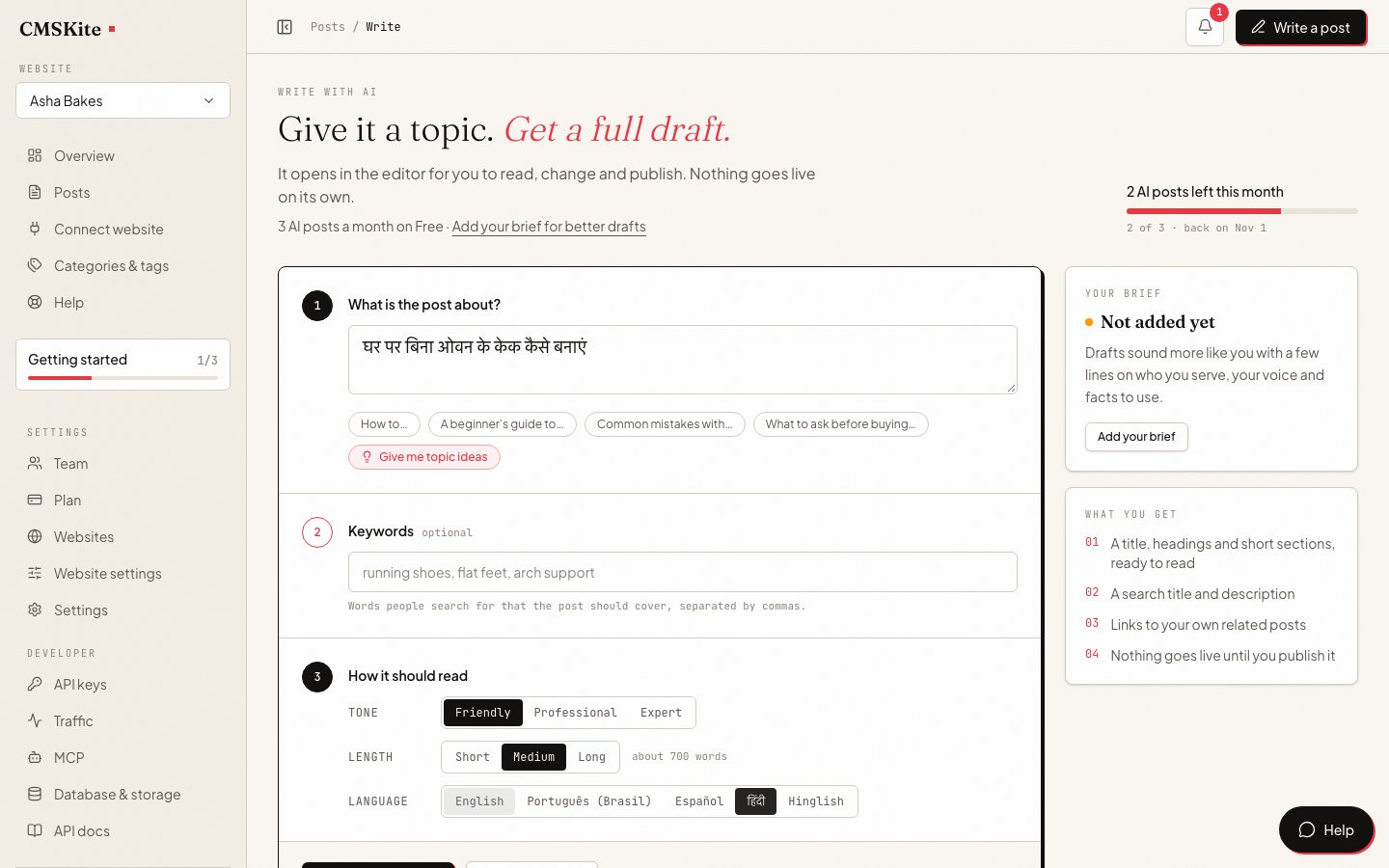
हिंदी, Hinglish or English: choose per post
The right language is the one your reader types into the search box. The same question, asked three ways, is three different searches:
| Your reader | Searches like this | Write in |
|---|---|---|
| Types on a Hindi keyboard, or speaks to their phone in Hindi | शादी के लिए केक कितने दिन पहले ऑर्डर करें | हिंदी |
| Writes Hindi with English letters, the way most people text | shaadi ke liye cake kitne din pehle order kare | Hinglish |
| Buys for a company, or lives anywhere in India and abroad | how early to order a wedding cake | English |
Not sure which? Read how customers write to you on WhatsApp and in your reviews; people usually search the way they text. Once your blog has been live for a while, Google Search Console (free) lists the exact words people used to find you, in whichever script they typed.
Keep each post in one language. If a topic matters to two audiences, write two posts, one per language, and link each to the other. That is also what Google asks for (more under SEO below).
AI se Hindi blog kaise likhe: four steps
Type the topic
Open Write with AI and describe the post in one sentence. You can type it in हिंदी, Hinglish or English; the language you pick in the next step decides what the draft is written in.
Pick हिंदी or Hinglish
Under Language, choose हिंदी for Devanagari or Hinglish for Hindi in Latin letters. Tone and length work as they do in English.
Press Write my draft
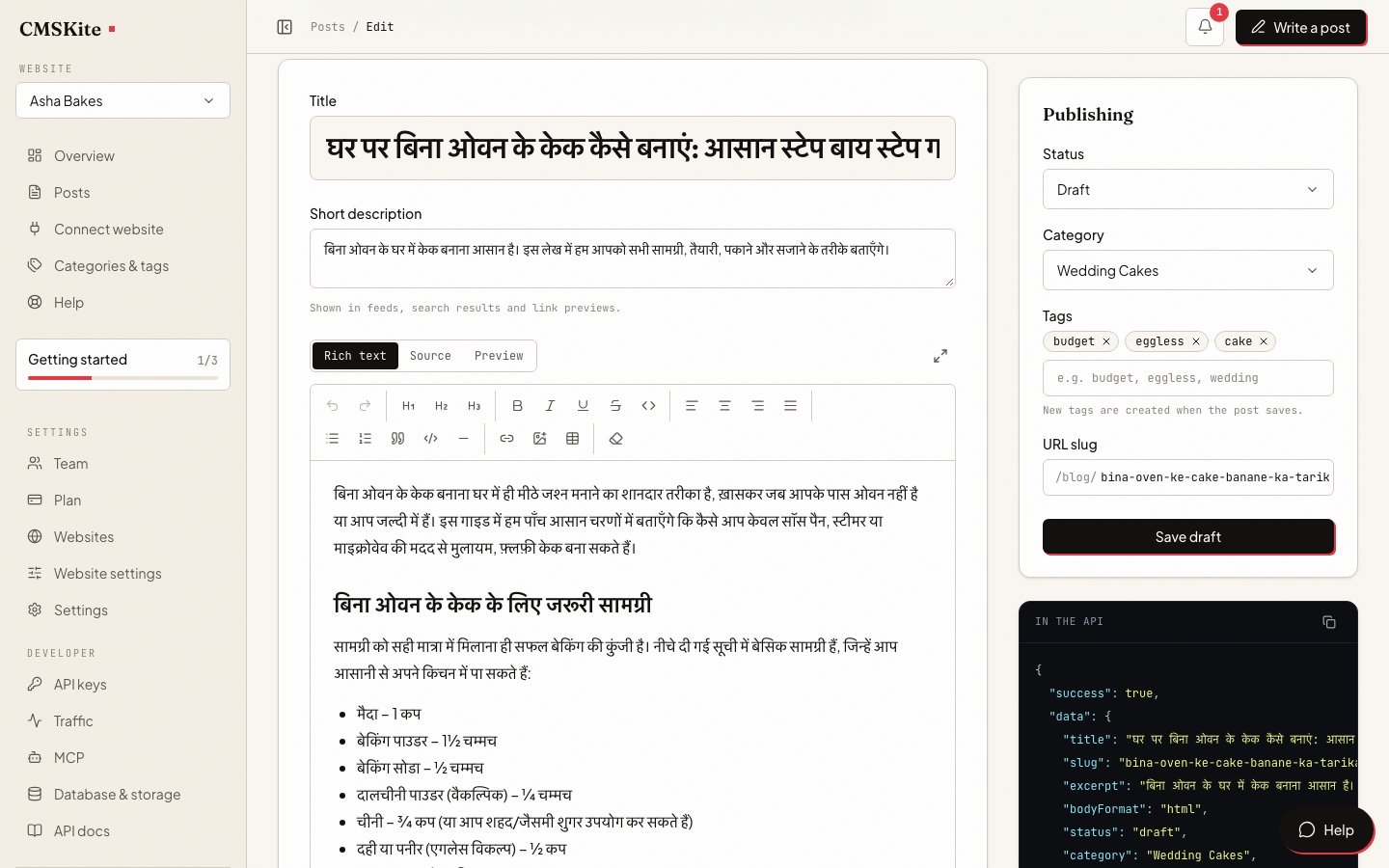
The draft opens in the editor with a title, headings, a search title and description, a category and tags. Before anything else, check the URL slug box (see the next section).
Read it as your customer would
Replace any word that sounds translated rather than spoken, add the details only you know, fill in anything in [square brackets], and publish.
A हिंदी or Hinglish draft counts as one AI post, the same as an English one. Every option, and the business brief that makes drafts sound like you, is in Writing with AI; what the writer does in general is on the AI blog writer page.
A Hindi title, a Latin address
A post’s slug, the last part of its address, uses only a to z, 0 to 9 and hyphens. The editor fills it in from the title, and spells Devanagari in Latin letters, so शादी becomes shaadi. You can change it to any Hinglish or English slug you like:
Title:    शादी के लिए केक कितने दिन पहले ऑर्डर करें
Slug:     shaadi-cake-kitne-din-pehle-order-kare
Address:  cmskite.com/b/asha-bakes/shaadi-cake-kitne-din-pehle-order-kare
A Latin address stays readable wherever it is pasted. A Devanagari one is shown correctly in the browser bar, but copied into an email or a message it often turns into long runs of codes like %E0%A4%B6.
How Hindi posts look and behave
- Fonts. The free blog link’s fonts are made for Latin letters, so Devanagari is drawn in the Hindi font already built into the reader’s phone or computer. Nothing extra downloads for it. On your own website, through the two-line embed, posts take your site’s fonts, and the browser falls back to the device’s Hindi font in the same way when your font has no Devanagari.
- Search. If your developer builds a search box on CMSKite’s search (part of the API on paid plans), it matches whole words as they are spelled. शादी finds posts containing शादी, but not शादियों, and not posts that wrote “shaadi”. English gets basic plural matching; Hindi does not. If readers look for a subject both ways, put the Hinglish spelling of its main word in the post’s excerpt, which search reads too. Details: Search.
- Reader numbers. Views are counted exactly as for English posts. See blog analytics.
- The page’s language mark. Pages on the free blog link are marked as English in their code; a post is not marked as Hindi on its own. Google says it ignores this mark and reads the words instead, so search is not affected. Some screen readers use it to choose a voice.
Getting Hindi posts found on Google
Google’s guidance for sites in more than one language is short, and it suits a blog well:
- Google reads the visible words to decide a page’s language, not code-level marks. A post written in हिंदी is a Hindi page.
- One language per page, and a separate address for each language version. Two posts on the same topic, one in हिंदी and one in English, each at its own address, is exactly that. Avoid placing a translation beside the original on the same page.
- The search title and description are what people see first. Check that they are in the post’s language and say what the post answers. They are separate fields in the editor, so you can change them without touching the post.
Everything else is the same as for any post: its own address, a canonical link, article data for search engines and a place in your sitemap. See SEO features.
Example topics, by business
Starting points that answer what customers actually ask. Use them as they are, or as a model for your own:
| Business | हिंदी | Hinglish |
|---|---|---|
| Bakery | शादी के लिए केक कितने दिन पहले ऑर्डर करें | Eggless cake order karne se pehle ye 5 sawal poochhein |
| Dental clinic | दांतों में कैविटी के शुरुआती लक्षण | Braces lagwane ki sahi umar kya hai |
| CA or tax practice | ITR भरते समय होने वाली आम गलतियां | GST registration kab zaroori hota hai |
| Coaching institute | बोर्ड परीक्षा से पहले आखिरी 30 दिनों की तैयारी | Ghar par spoken English kaise improve karein |
| Interior designer | छोटे फ्लैट को बड़ा दिखाने के 7 तरीके | Modular kitchen ka budget kaise plan karein |
For a clinic, a CA or anyone giving advice, the draft is a starting point: check every figure and rule against what you know before publishing.
On every plan
| Free | Starter | Team | |
|---|---|---|---|
| Price | Free forever | ₹799 / $9 a month | ₹2,499 / $29 a month |
| Posts written with AI | 3 a month | 30 a month | 30 a month |
| Posts | 35 | Unlimited | Unlimited |
हिंदी and Hinglish are available on every plan, Free included. Writing or editing a Hindi post yourself, without AI, never counts against the monthly AI allowance.
Questions
- AI se Hindi blog kaise likhe?
- Open Write with AI, type the topic in one sentence, choose हिंदी (or Hinglish) under Language and press Write my draft. The draft opens in the editor. Add a slug in Latin letters, read it through, correct anything that sounds translated, and publish.
- Is Hinglish good for SEO?
- If your customers search in Hinglish, yes. Google decides a page’s language from its visible words, and a post written the way people type their search answers that search directly. Keep each post in one language rather than mixing हिंदी and Hinglish.
- Why is my Hindi post’s address in English letters?
- Post addresses use only a to z, 0 to 9 and hyphens, so they stay readable when shared. Write the slug in Hinglish or English; the title and the post stay in हिंदी.
- Will Hindi text show properly on my readers’ phones?
- Yes. Devanagari is drawn in the Hindi font built into the reader’s phone or computer, so it shows without anything extra being downloaded.
- Can one blog have Hindi and English posts?
- Yes. Language is chosen per post. A topic you want to reach both audiences with should be two posts, one in each language, each with its own address.
- Does CMSKite’s search work in Hindi?
- Yes, for whole words as they are spelled. Search is part of the API on paid plans, for a site whose developer adds a search box. It does not connect different forms of a word, or a Hinglish spelling with its Devanagari one.
Related
- AI blog writerWhat the writer does in any language, and how drafts are counted.
- Writing with AI: the guideEvery option, and the brief that makes drafts sound like your business.
- SEO featuresWhat each post gets for search engines, in any language.
- Categories, tags and authorsOrganising a blog that mixes हिंदी, Hinglish and English posts.
- Your free blog linkWhere a Hindi post appears the moment you publish it.
Checked