CMSKite for Wix
Add a blog to your Wix site, and know exactly how it ranks.
Paste two lines into a Wix Embed HTML element and your CMSKite posts appear on that page. Wix shows pasted code inside a frame, which changes how search engines see the posts, so this page is plain about it: what works, what does not, and when Wix’s own blog is the better choice.
Why not just use Wix Blog?
Wix has its own blog app, Wix Blog (in the Editor: Add Apps, search for Wix Blog, Add to Site). If you are happy writing in Wix and want every post to rank as a page of your Wix domain, use it. On Wix, that is the one thing CMSKite cannot do, for the reason in the SEO section below.
CMSKite makes sense on Wix when:
- Writing matters more than where a post ranks. Write with AI drafts a post from one sentence, in English, हिंदी or Hinglish.
- Your writers work on more than one site. Wix Blog’s writer roles keep writers out of the Wix Editor too, but they join your Wix site as collaborators. CMSKite writers sign in to CMSKite only, and the same people and roles can write for your other websites.
- You may leave Wix one day. The posts live in CMSKite, so the blog moves with you: the same two lines work on WordPress, Shopify, Webflow, Squarespace or any HTML page.
- You want a blog live today. Your free blog link works the moment you sign up, before Wix is touched.
Add it to a Wix page
Copy your two lines
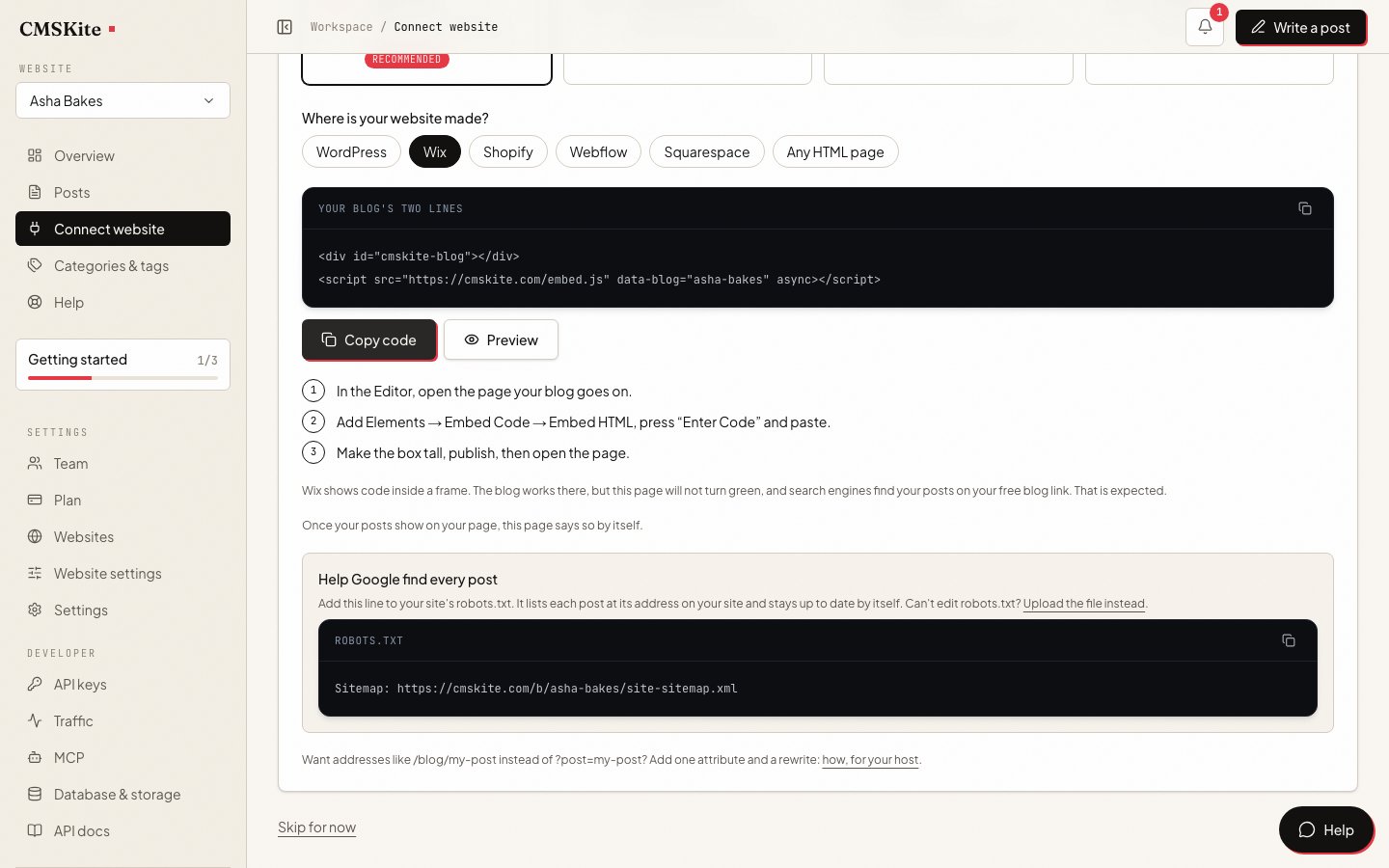
Sign up free. In the dashboard open Connect your website, choose Wix, and press Copy code.
Open the page in the Wix Editor
Open the page your blog goes on, or add a page called “Blog” and put it in your menu.
Add an Embed HTML element
Click Add Elements on the left, then Embed Code → Popular Embeds → Embed HTML. Click the new element, press Enter Code, paste the two lines under Add your code here, and press Apply.
html<div id="cmskite-blog"></div> <script src="https://cmskite.com/embed.js" data-blog="your-blog" async></script>Make it big enough, then publish
Drag the element as wide as your content and tall enough for a long post. Press Publish and open the page: your posts are listed, and a click opens the post inside the element.
Wix Harmony editor: press + Add → Elements, then Embed under more options, drag Embed code onto the page, and paste the lines in its Settings.

Common problems and fixes
Posts are cut off or scroll inside a box
Wix shows pasted code in a frame of the size you give the element, and Wix says these frames are not responsive. Make the element taller and check the page on mobile too.
The element shows nothing, or asks for a website address
It was added as Embed a site, which shows another website. Delete it, add Embed HTML, and use Enter Code.
Opening a post does not change the address in the browser
The post opens inside the frame, so your Wix page keeps its own address. To share one post, share its address on your free blog link.
CMSKite never shows your website as connected
Expected on Wix. The embed reports the page it runs on, and inside Wix’s frame that page is not on your domain, so CMSKite cannot confirm it. The blog still works; message us if you want us to look.
SEO on Wix: what actually happens
When a post opens, the embed gives the page it runs in the post’s title, description, canonical link and article data. On Wix that page is the frame, not your Wix page. Your Wix page keeps its own title, description and canonical link, and search engines do not see each post as a page of your Wix site.
So on Wix your posts rank on your free blog link, at addresses like cmskite.com/b/your-blog/my-post. Because the frame never connects your Wix site, each post’s canonical link there names that same address, which is what Google asks for. There is no Wix canonical link to remove and nothing to change in Wix’s SEO settings. Link to your free blog from your Wix menu or footer so search engines and visitors find it.
What about Wix’s Custom Code setting? In your site’s dashboard, Settings → Custom Code (for a published site with a connected domain) adds code to the page itself rather than a frame, and can target chosen pages. But it places code in the head or at the very start or end of the body, outside the sections you lay out in the Editor, so the posts would not sit inside your design. We have not tested CMSKite this way and do not recommend it.
What it costs
| Free | Starter | Team | |
|---|---|---|---|
| Price | Free forever | ₹799 / $9 a month | ₹2,499 / $29 a month |
| Posts | 35 | Unlimited | Unlimited |
| Posts written with AI | 3 a month | 30 a month | 30 a month |
| Websites | 1 | 1 | 5 |
| Team members | 2 | 3 | 5 |
Embed HTML is part of the Wix Editor, and Wix’s help lists no plan requirement for it. The two lines are the same on every CMSKite plan.
Sources
- Wix Editor: Embedding a Site or a Widget — Wix Help Center
- Wix Harmony Editor: Embedding a Link or HTML Code — Wix Help Center
- Wix Editor: Embedding Custom Code on Your Site — Wix Help Center
- Wix Blog: Adding and Setting Up Your Blog — Wix Help Center
- JavaScript SEO basics (canonical links) — Google Search Central
Checked on 3 October 2026.
Questions
- Does it work on a free Wix site?
- Wix’s help lists no plan requirement for Embed HTML, and the two lines are the same on every CMSKite plan. Wix only shows code that uses HTTPS, which ours does.
- Will my posts show up on Google?
- Yes, on your free blog link, where each post has its own address, title, description and canonical link. They do not rank as pages of your Wix domain; if that matters most, Wix Blog is the better fit.
- Can I use Wix Blog and CMSKite together?
- Yes, they do not touch each other. Just avoid writing the same topic in both, so two posts do not compete for one search.
- Does it slow my Wix site down?
- No. The script is a few kilobytes and runs only inside the element on the page you put it on. The posts load from CMSKite, not from Wix.
- Do I need Velo or the Custom Code setting?
- No. An Embed HTML element is all it needs.
Related
- Your free blog linkWhere your posts live and rank when your site is on Wix.
- AI blog writerDrafts in English, हिंदी or Hinglish, for you to edit and publish.
- Add your blog with two linesEvery option of the embed, and what it does for search engines.
- CMSKite for SquarespaceThe same blog on a Squarespace site, without a frame.
- CMSKite for WebflowThe same blog on a Webflow site.
- CMSKite vs Wix BlogWhich one fits, side by side, and when Wix Blog wins.
Checked