How to Manage Multiple Websites with Workspaces
Learn how workspaces and projects help companies organize multiple websites, brands, and content in one clean and scalable structure.
5 min read
Managing multiple websites can get messy quickly. A company may have a main website, a blog, a product website, a marketing site, or separate websites for different brands. If all of that content is mixed together, it becomes harder to manage.
A simple way to keep things organized is to separate your content into workspaces and projects.
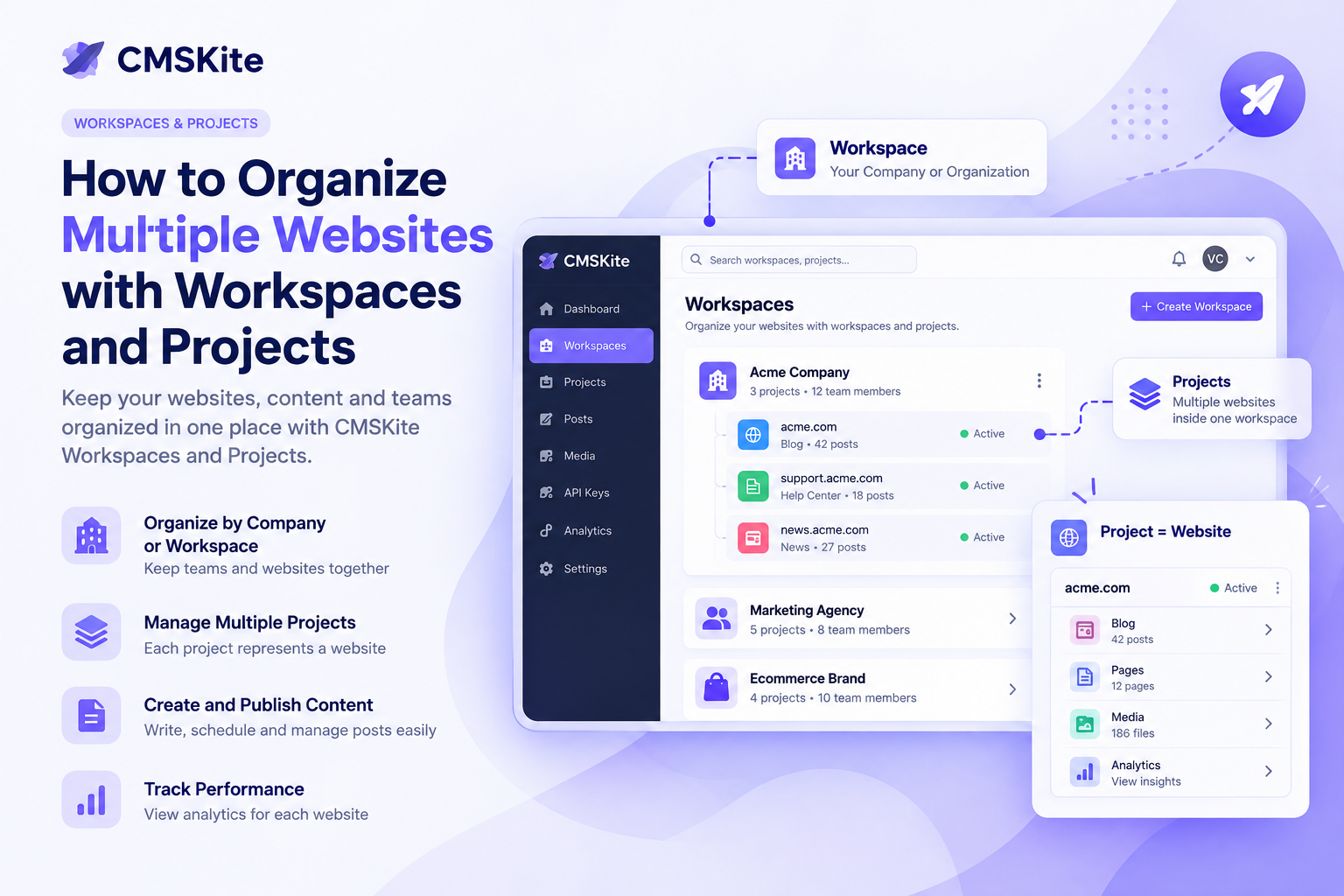
In this model, a workspace represents a company or organization, while each project represents one website or digital property belonging to that organization. This gives teams one central place to manage multiple websites without mixing their content, settings, or data.
What is a workspace?
Think of a workspace as the company-level container.
For example, imagine a company called Acme. Acme may operate several websites:
- acme.com — the main company website
- acmejobs.com — the careers website
- acmeproducts.com — the product website
- acmeblog.com — a dedicated content site
Instead of creating a completely separate account for every website, Acme can use one workspace for the organization.
The workspace becomes the place where the company's projects are grouped together.
This makes the structure easy to understand:
Company → Workspace → Projects → Website content
The important idea is that the workspace is about the organization, not one individual website.
What is a project?
A project is a website or digital property inside a workspace.
If Acme has four websites, it can have four projects inside the Acme workspace.
Each project can have its own website details, content, categories, tags, integrations, and API configuration.
For example:
Acme Workspace
- Project: Acme Main Website
- Project: Acme Careers
- Project: Acme Products
- Project: Acme Blog
This separation is useful because content belonging to one website does not need to be mixed with content from another website.
Why separate workspaces from projects?
The distinction becomes especially useful when a person or team manages more than one organization.
Imagine an agency working with three companies:
Agency Workspace
- Client A Website
- Client A Blog
Startup Workspace
- Startup Main Website
- Startup Product Website
Ecommerce Company Workspace
- Store Website
- Content Website
Each workspace represents a different organization, and each organization can have as many projects as it needs.
This keeps the structure logical as the number of websites grows.
One workspace can contain many projects
A workspace is not limited to one website.
That is one of the biggest advantages of this model.
A growing company might start with one website and later add more:
- Create the company workspace.
- Add the main website as a project.
- Add a product website as another project.
- Add a careers website.
- Add regional or brand-specific websites when needed.
You don't need to rethink the entire organization every time a new website is launched.
The workspace stays the same while new projects are added underneath it.
Every workspace can have its own projects
The other important part is isolation between organizations.
Suppose an agency manages websites for two different companies.
Workspace A belongs to Company A.
It can contain:
- Company A Website
- Company A Blog
- Company A Careers
Workspace B belongs to Company B.
It can contain:
- Company B Website
- Company B Products
- Company B Blog
Projects from Company A don't need to be mixed with projects from Company B.
This makes it much easier to understand which content belongs to which organization.
Why this structure is useful for teams
As a company grows, content management usually involves more than one person.
Marketing teams may manage blog posts. Developers may manage integrations. Content writers may create articles. Managers may need visibility across websites.
A workspace-based structure gives everyone a clear organizational boundary.
Instead of asking, "Which website does this content belong to?" every time, the hierarchy already provides the answer.
Workspace = who the organization is
Project = which website you're working on
That simple distinction can remove a lot of confusion.
A practical example
Let's say a digital company operates three brands: Alpha, Beta, and Gamma.
Each brand has its own website and content strategy.
You could organize them like this:
Alpha Workspace
- Alpha Website
- Alpha Blog
Beta Workspace
- Beta Website
- Beta Product
Gamma Workspace
- Gamma Website
- Gamma Careers
- Gamma Blog
Now each organization has its own workspace, while every website remains a separate project.
If Gamma launches another website next year, you simply add another project to the Gamma workspace.
What are the benefits?
1. Better organization
Everything starts with a clear hierarchy. You know which organization a project belongs to and which website that project represents.
2. Easier multi-website management
Companies with several websites don't need to manage every website as an unrelated system.
3. Cleaner content separation
Each project's posts and content can remain associated with the correct website.
4. Easier team management
A company can think about access and collaboration at the organization level while keeping individual projects separated.
5. Easier scaling
Adding another website doesn't mean creating an entirely new organizational structure. You can add another project to the existing workspace.
Workspace vs. project: a simple way to remember it
If the terminology feels confusing, remember it this way:
A workspace is the company. A project is the website.
For example:
Company: Acme
→ Workspace: Acme
→ Project: Main Website
→ Project: Careers Website
→ Project: Product Website
→ Project: Blog Website
This mental model makes the architecture easy to understand, even if you're not technical.
When should you use multiple workspaces?
Use separate workspaces when you are dealing with separate organizations or companies that should have their own boundaries.
For example, an agency managing multiple clients may use one workspace per client.
A company with several websites, on the other hand, can usually keep those websites inside the same workspace as separate projects.
The goal is simple: use the workspace to represent the organization and projects to represent the websites or digital properties inside it.
Frequently asked questions
Can one workspace have multiple projects?
Yes. A workspace is designed to contain multiple projects, so one organization can manage several websites from the same workspace.
Can different workspaces have their own projects?
Yes. Each workspace has its own collection of projects. This allows different organizations to keep their websites and content separated.
Is a project the same as a website?
In this model, a project represents a website or digital property. It gives that website its own content and project-level configuration.
Why not create a separate workspace for every website?
You can, but it usually makes more sense to keep websites belonging to the same organization under one workspace. That way the company has one organizational home and each website remains a separate project.
A scalable foundation for multi-website content
Managing one website is relatively simple. Managing five, ten, or fifty websites is different.
The challenge isn't only creating content. It's keeping organizations, websites, teams, and content properly separated while still making everything easy to manage.
The workspace-and-project model solves this by giving you a simple hierarchy:
Organization → Workspace → Projects → Website content
Once you think about the workspace as the company and the project as the website, the whole structure becomes much easier to understand.
If you're also evaluating how a modern website can keep its content separate from its frontend, see our guide to headless blog APIs. For teams building with Next.js, our guide to Next.js blog architecture covers the broader content architecture.
For companies, agencies, and teams managing multiple websites, this kind of organization provides a clean foundation that can grow as the business grows.
- #cmskite
- #content-management
- #blog-architecture
- #web-development
- #headless-cms