CMSKite for Webflow
A blog on your Webflow site, without Webflow CMS items.
Paste two lines into a Code Embed element on one page and every post you write in CMSKite appears there, in your site’s fonts and colours. The posts live in CMSKite, so they never count against a Webflow CMS item limit, and a site plan without the CMS can still have a blog.
Why not just use the Webflow CMS?
If your plan includes the CMS, you like designing Collection pages, and your writers are at home in Webflow, the Webflow CMS is a good blog. CMSKite is for the other cases:
- Your plan has no CMS, or too few items. At the time of writing, Webflow’s pricing lists 50 CMS items on the free Starter plan, no CMS on Basic, and 20,000 on Premium. CMSKite posts are not Webflow items at all; your CMSKite plan sets how many you publish (table below).
- Writers stay out of the Designer. Invite them to CMSKite as editors; they cannot change your site.
- Nothing to design per post. The embed lays out the list and each post for you, in your page’s font and colours.
- A draft from one sentence. Write with AI drafts posts in English, हिंदी or Hinglish.
Add it in five minutes
Copy your two lines
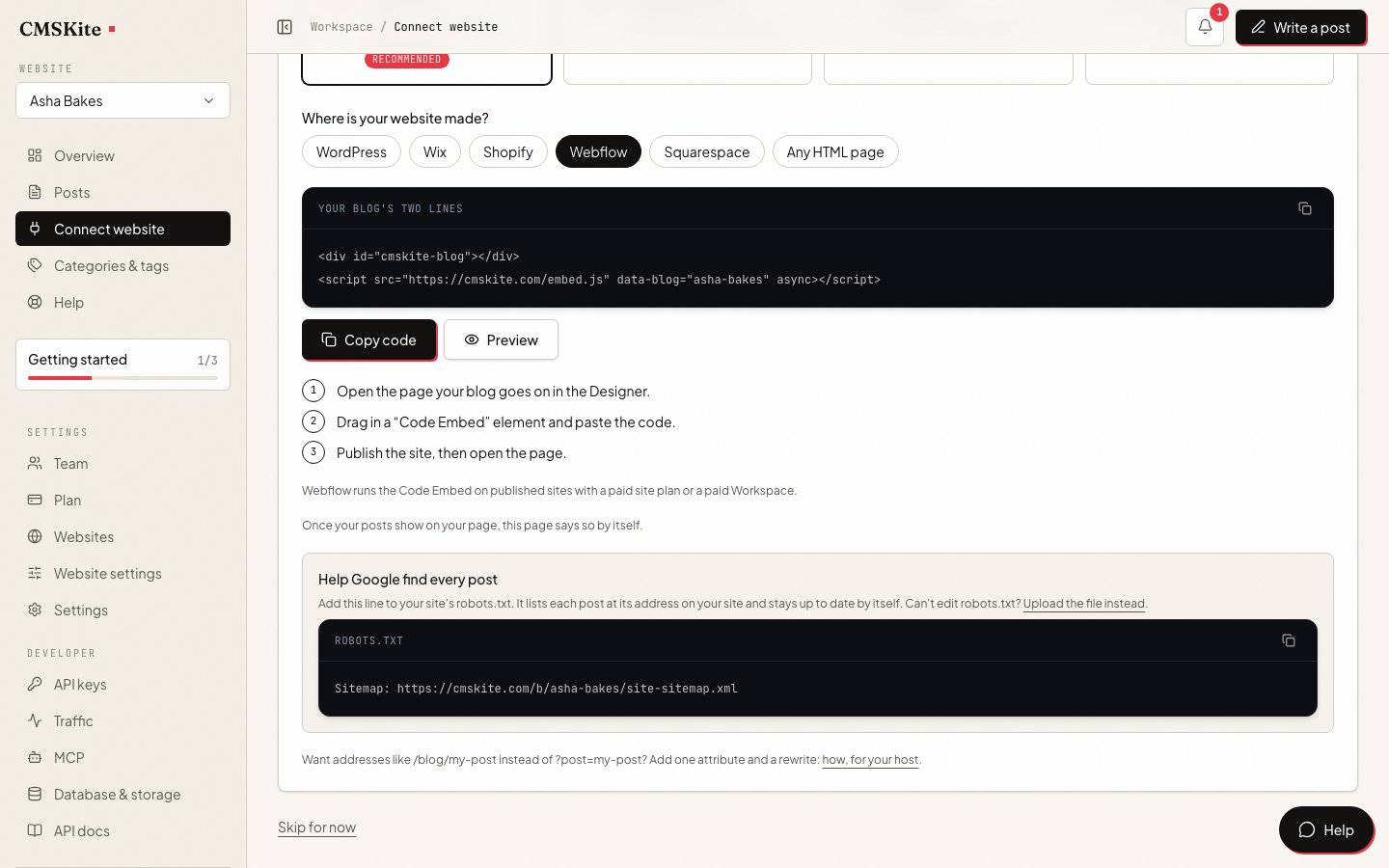
Sign up free. In the dashboard open Connect your website, choose Webflow, and press Copy code.
Open your blog page in the Designer
Open the page your blog goes on, or add a static page called “Blog” from the Pages panel.
Add a Code Embed element
Open the Add panel, drag a Code Embed element into the section where the posts should appear, paste the two lines, then save and close the code editor.
html<div id="cmskite-blog"></div> <script src="https://cmskite.com/embed.js" data-blog="your-blog" async></script>Publish, then open the live page
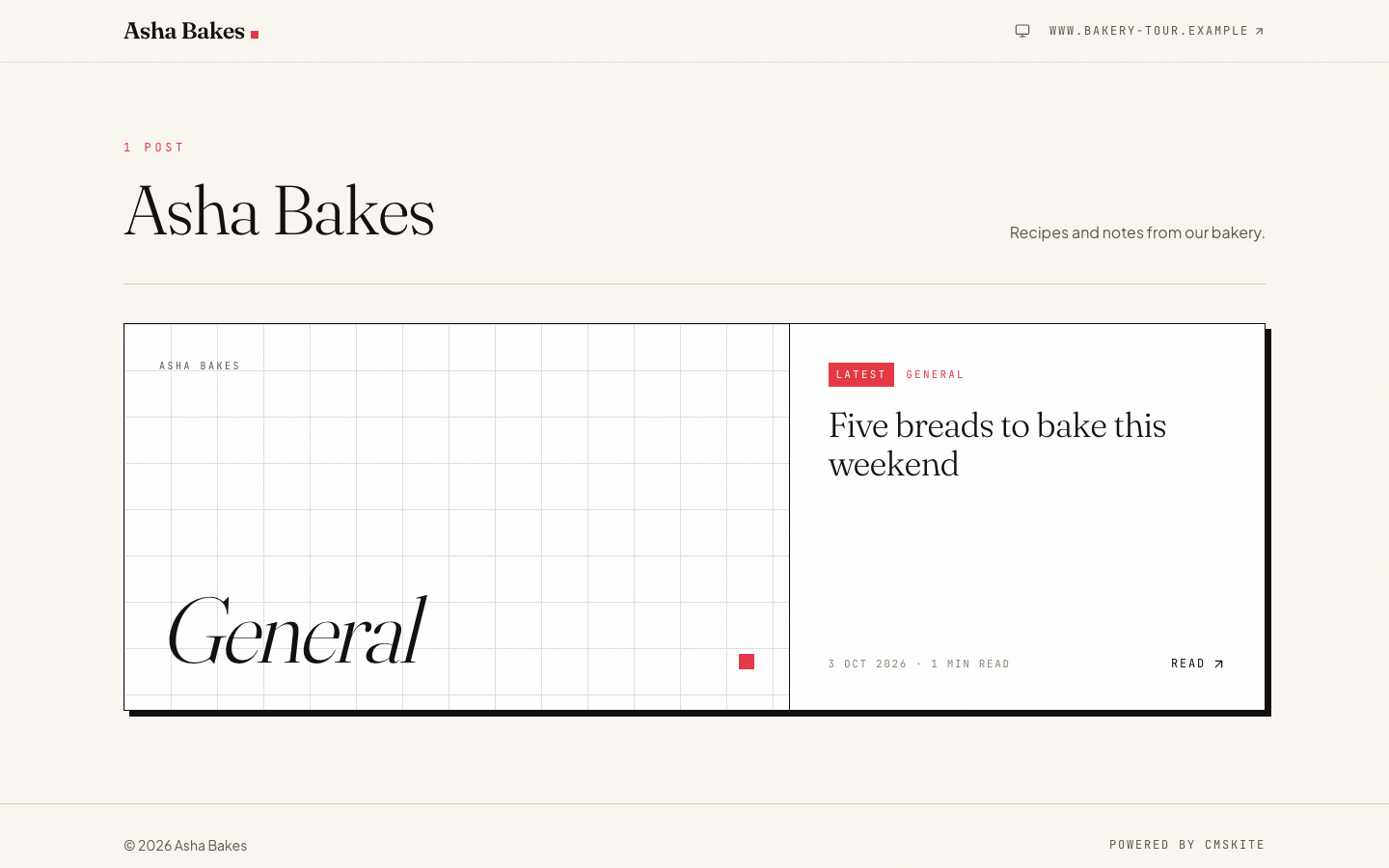
On the canvas you only see a placeholder: Webflow runs scripts in preview and on the published site. Publish and open the page on your domain. Your posts are listed, and a click opens the post on the same page.
Webflow allows the Code Embed element on sites with an active Site plan, or in a Core, Growth, Agency or Freelancer Workspace. Any paid site plan counts, including Basic, which has no CMS.
Common problems and fixes
The Designer shows only a placeholder
Normal. Webflow shows a placeholder for any script on the canvas. Use preview, or publish and open the live page.
Nothing appears on the live site
Check that the site has a paid Site plan (or your Workspace one of the plans above), and that you published after adding the element: custom code does not go live until you publish.
The posts are squeezed into a narrow column
A Code Embed takes the width of the element it sits in. Put it in a container as wide as your text; the blog itself stops at a comfortable reading width and centres.
The page layout breaks after pasting
Paste only the two lines. Webflow warns that
<html>,<head>or<body>tags inside an embed break the layout.
SEO on Webflow
When someone opens a post, the embed gives the page that post’s title, description, canonical link and article data, so search engines file it as its own page of your site. Two Webflow settings decide how cleanly that works.
1. Check your canonical setting. Webflow adds canonical links when you set them: Site settings → SEO → Global canonical tag URL adds one to every page, and a page’s SEO settings can set its own Page canonical URL. If both are empty for your blog page, there is nothing to do: the post’s canonical link is the only one, as Google asks. If the global one is set, Webflow prints the blog page’s own address as its canonical, and there is no setting to leave one page out; a page canonical can only swap it for another address. Webflow itself warns that a canonical from another tool plus the global one makes several canonical tags. Either clear the global field (ask whoever set it first), or keep it and accept that Google may treat some posts as your blog page.
2. Give Google your posts’ sitemap. Webflow’s sitemap only knows your Webflow pages. We keep a sitemap of your posts at their addresses on your site. In Site settings → SEO → Indexing, add this line to robots.txt, save and publish. Webflow keeps its own sitemap line there too; two is fine.
Sitemap: https://cmskite.com/b/your-blog/site-sitemap.xmlKeep the default ?post= addresses; Google indexes them.
What it costs
| Free | Starter | Team | |
|---|---|---|---|
| Price | Free forever | ₹799 / $9 a month | ₹2,499 / $29 a month |
| Posts | 35 | Unlimited | Unlimited |
| Posts written with AI | 3 a month | 30 a month | 30 a month |
| Websites | 1 | 1 | 5 |
| Team members | 2 | 3 | 5 |
On the Webflow side you need a plan that allows the Code Embed (above); the CMS is not needed. The two lines are the same on every CMSKite plan.
Sources
- Custom code embed — Webflow Help Center
- Custom code in head and body tags — Webflow Help Center
- Set canonical tags to improve SEO — Webflow Help Center
- Set robots.txt rules — Webflow Help Center
- Create a sitemap in Webflow — Webflow Help Center
- Pricing — Webflow
- JavaScript SEO basics (canonical links) — Google Search Central
Checked on 3 October 2026.
Questions
- Do I need a paid Webflow plan?
- For the Code Embed, yes: an active Site plan on the site, or a Core, Growth, Agency or Freelancer Workspace. Basic is enough. Until then, your free blog link works.
- Do CMSKite posts count against my Webflow CMS items?
- No. They are fetched from CMSKite when the page opens; Webflow never stores them.
- Can I keep my Webflow CMS blog?
- Yes. Its Collection pages stay as they are. Put CMSKite on a page of its own and avoid writing the same topic in both.
- Will my posts show up on Google?
- Yes. Each post opens at its own address on your site, with its own title, description, canonical link and article data, and our sitemap lists every one. Check the canonical setting above first.
- Does it slow my site down?
- No. The script is a few kilobytes, loads after the rest of the page, and only runs on the page you put it on.
Related
- Embed a blog on any siteHow the two lines work, on Webflow and everywhere else.
- AI blog writerDrafts in English, हिंदी or Hinglish, for you to edit and publish.
- Add your blog with two linesEvery option of the embed, and how the sitemap works.
- SEO built inWhat search engines get from every post you publish.
- CMSKite for SquarespaceThe same blog on a Squarespace site.
Checked