Feature · Team and roles
One blog, several people, and nobody holding keys they do not need.
Invite the people who write, edit and run your blog, and give each a role: who drafts, who decides what goes live, who sees the reader numbers, who looks after the website’s keys. Roles are checked by the API on every request, so a hidden button is never the only thing in the way.
Who it is for
- A business with a few writers. The owner, a marketing hire and a freelancer, each with their own login and only the access their job needs.
- Teams where one person approves. Writers save drafts; an editor reads them and decides what goes live.
- Agencies and freelancers running blogs for several clients, with each person let into only the clients they work on.
- A developer who wires up the site and needs the API keys, but has no reason to edit or publish posts.
The built-in roles
Six ready-made roles, the same in every account. What each can do, straight from the permission list the API checks:
| Role | Posts | Reader numbers | Keys, webhooks, own database | Team | Plan and billing |
|---|---|---|---|---|---|
| Owner | Write, publish, delete | Yes | Yes | Invite, change, remove; set per-person exceptions | Yes |
| Admin | Write, publish, delete | Yes | Yes | Invite, change, remove | No |
| Developer | Read only | Yes | Yes | No | No |
| Editor | Write, publish, delete | No | No | No | No |
| Analyst | Read only | Yes | No | No | No |
| Viewer | Read only | No | No | No | No |
Editors also manage categories, tags and authors, since those are content. Admins and developers can change a website’s settings; admins can also delete a website. Owner, admin and developer can read the activity log.
Publishing is a permission of its own, separate from writing. Somebody without it sees Published and Scheduled greyed out in the editor, with the line “Your role can write drafts; an editor publishes.” If they try anyway, through the API or an AI assistant, the API refuses. Scheduling counts as publishing, because the post goes live later without anyone pressing a button.
When the built-in roles do not fit
The account owner can make roles of their own under Team → Roles → New role: a name, a line on who it is for, and a level for each area of the dashboard (View, Full, or Custom to pick exactly which permissions). Four starting points are offered:
| Starting point | What it is for |
|---|---|
| Writer | Writes drafts; somebody else publishes. |
| Publisher | Writes, publishes and tidies up posts. |
| Marketing | Publishes posts and watches the reader numbers. |
| Read-only | Sees posts and reader numbers; changes nothing. |
Changing a role changes it for everybody who holds it. For a one-off difference, such as an editor who may not delete, the owner adds an exception for that one person while inviting them or later.
One rule keeps this safe: nobody hands out what they do not hold. An admin cannot invite somebody with access to billing, because admins do not have it. A role they cannot give is shown, greyed out, with “Has permissions you do not hold yourself.”
Inviting someone
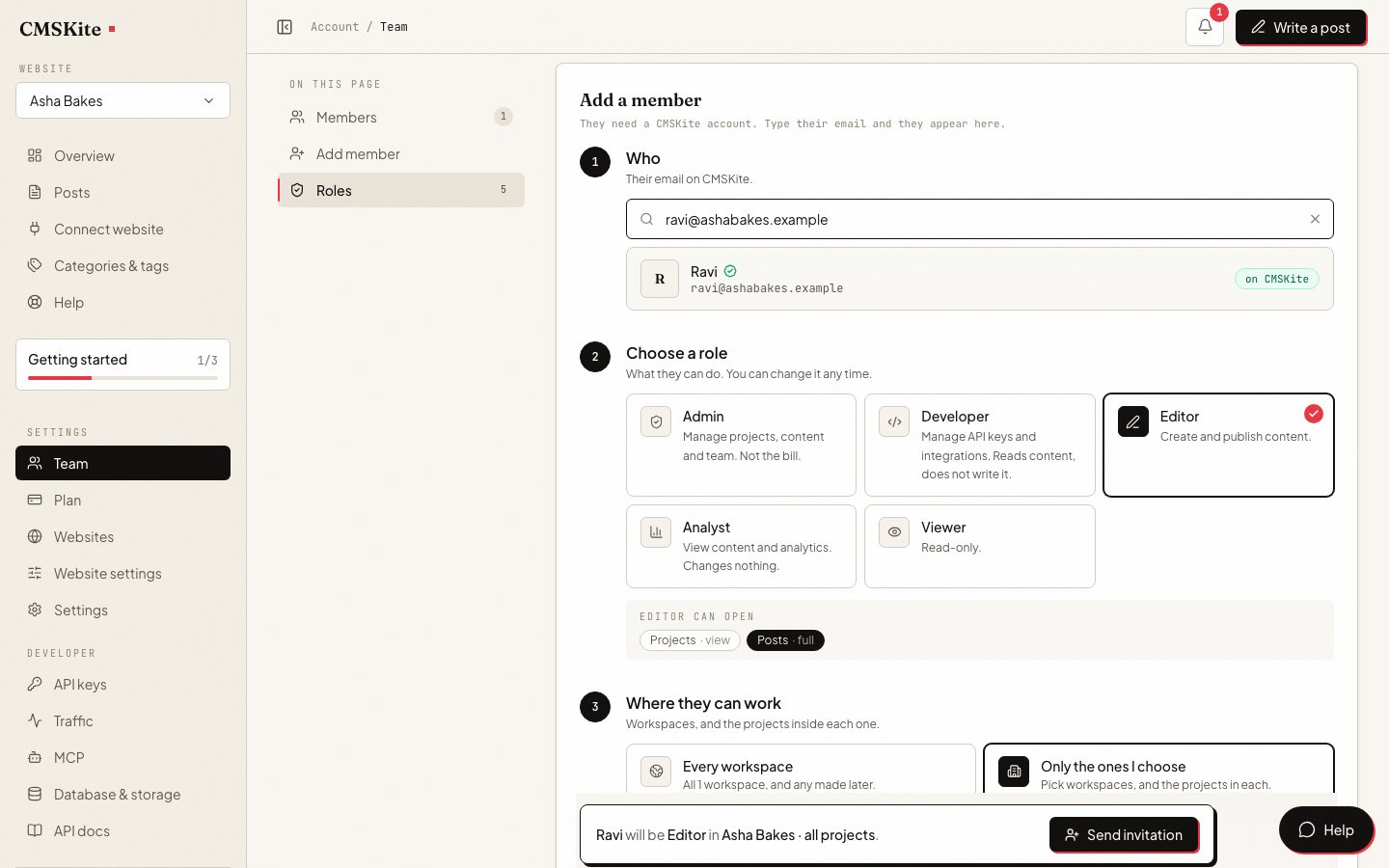
Open Team → Add member and type their email
They need a CMSKite account, which is free. If nobody uses that address yet, the page says so: ask them to sign up with it, then add them.
Choose a role
A built-in role or one of yours. Under the cards, the page lists what the chosen role can open.
Choose where they can work
Every workspace, including any made later, or Only the ones I choose, and inside each workspace, all its websites or only some.
Send invitation
It appears in their CMSKite notifications and arrives by email. It lasts a week and can be used once. Until they accept or you cancel it, it holds a seat.
Websites, workspaces and agencies
Each website is its own project, with its own posts, categories, authors, API keys, AI writing brief and free blog link. A workspace groups websites. Seats belong to the account, not to one workspace, so the same person can work across several.
For an agency that means one login per person and access set per client. A freelance writer can be an editor on two clients’ websites and see nothing of the rest. Reader numbers follow the same line: somebody let into some websites sees the figures for those websites only, even in totals.
Authors are bylines, not logins
The name shown on a post is an author, and an author is content, not a user account. Add one under Categories & tags → Authors. A guest writer, a pen name or a doctor who reviews your posts can be credited without an account, a password or a seat. An author can be linked to a team member when they are the same person.
Today a post’s author is set through the API or an AI assistant (the authorId field); the post editor in the dashboard does not have an author picker. The Posts list shows each post’s author. More in Categories, tags and authors.
Keeping track, and taking access away
- Activity log. Each website’s overview lists recent changes to its posts, keys and settings, for owners, admins and developers. The log is kept for 24 months.
- Removing someone ends their access. Their posts stay: posts belong to the website, not to whoever wrote them.
- AI assistants act as a person. An AI tool you connect is limited to what you allowed and to your current role, checked on every request. Change somebody to Viewer and the assistant they connected loses write access on its next call. See for developers.
Seats on each plan
| Free | Starter | Team | |
|---|---|---|---|
| Price | Free forever | ₹799 / $9 a month | ₹2,499 / $29 a month |
| Team members | 2 | 3 | 5 |
| Websites | 1 | 1 | 5 |
The owner counts as a seat, and so does each invitation waiting to be accepted. When every seat is taken, the Team page says so; remove someone or add seats on the Plan page.
Questions
- Can a writer draft posts without being able to publish them?
- Yes. Make a role from the Writer starting point, or give an editor an exception that removes publishing. They can write and save drafts; the editor’s Published and Scheduled options are greyed out for them, and the API refuses if they try another way.
- Is there an approval queue?
- There is no separate review queue or comment thread. Drafts sit in Posts, where somebody who can publish opens them, makes changes and publishes.
- Do guest writers need an account?
- No. Authors are bylines you add under Categories & tags. Only people who log in to the dashboard need an account and a seat.
- Does the person I invite have to pay?
- No. They sign up free with the address you invited, and use one of the seats on your plan.
- Can I limit someone to one client’s website?
- Yes. When inviting, choose Only the ones I choose, then the workspace and the website. They will not see other websites, their posts or their numbers.
- Can an editor see how many people read a post?
- Not by default: the Editor role has no access to reader numbers. Give that one person an exception, or use the Marketing starting point for a role that both publishes and sees the numbers.
Related
- Categories, tags and authorsAuthors as bylines, and how to organise a shared blog.
- Blog analyticsThe reader numbers analysts and owners see.
- For developersAPI keys and connected AI tools, and what each role can do with them.
- AI blog writerDrafts any editor can start, with a brief per website.
- PricingSeats and websites on each plan.
Checked